Soldering Kits for Teens: The Best Builds for Ages 13–17 (2026)
Teen-level soldering kits picked by what they become: a playable console, a Bluetooth speaker, an Arduino-compatible board, a desk clock, a sensor gadget and a first surface-mount board. Plus what to add and how much supervision teens need.
Affiliate disclosure: As an Amazon
Associate we earn from qualifying purchases. We may earn a commission when you buy through
links on this page — at no extra cost to you. Read our affiliate disclosure for details.
For most teenagers, the best soldering kit is the PEMENOL 7-in-1 Retro Game Console. It becomes a handheld they will actually play, and its three selectable difficulty levels suit a first-timer or a teen who has soldered before. For a teen who wants to code, the amomii Testudo is the better choice, because its board carries an Arduino-compatible microcontroller.
These picks are older and harder than the ones on our soldering kits for kids page. Each ends in something a 13–17-year-old will care about: a game, a speaker, a radio, a clock, a sensor gadget or real surface-mount skills. One thing to know before you buy: none of these kits includes a soldering iron or solder. The gift bundle section lists what to add so the kit works on day one.
Best for: Teens, students, and gamers who want a payoff they can play.
For the teen who needs a reason to reach the last joint. It becomes a 7-in-1 handheld with its own display, controls and housing, and three difficulty levels fit very different skill levels.
Watch out for: More components means a longer build
Best for: Beginners and gift-givers who want a kit that actually does something fun.
For the self-taught teen curious about programming. Three builds (digital piano, game console, keypad) on a board with an Arduino-compatible microcontroller, with PDF and video tutorials.
Watch out for: You still need to supply your own soldering iron and solder
Best for: Music lovers who want a build that earns a permanent spot on the desk.
For the motivated beginner who wants something to listen to. A Bluetooth, USB and FM speaker with its own enclosure. Through-hole throughout, but a substantial build.
Watch out for: More joints than a beginner blinky kit
Best for: Improvers ready for finer joints and a kit that teaches real electronics.
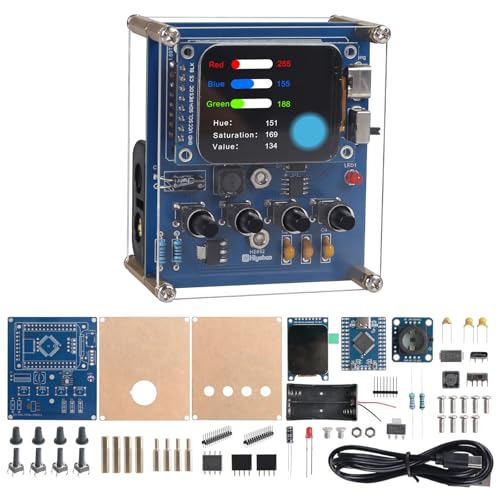
For improvers who found LED kits too easy. A denser board with a TCS34725 colour sensor and 1.69-inch TFT display that teaches RGB and HSV across four modes.
Watch out for: Tighter joints suit a second or third build, not a first
How to choose a soldering kit for a 13–17-year-old
Start with where the teen is now, not their age. Then pick the finished device they will care about, and check what the box leaves out.
Match the skill stage
First time soldering: through-hole parts on a forgiving layout. CircuitMess recommends through-hole for beginners and notes that surface-mount parts frustrate even adults. The clock, the radio, the Testudo and the PEMENOL console on its easiest level all fit here.
Ready for more: surface-mount (SMD) practice, like the Gikfun EK7028. CircuitMess places 50+ component builds, surface-mount work and multi-session projects at the 13+ stage.
A long build gets finished when the teen wants the result. CircuitMess names clear visual instructions and a satisfying finished device as key predictors of whether a kit gets finished. Give a gamer the console and a music fan the speaker. Give a teen who talks about coding the Testudo, and one who likes practical things the clock.
Check what's in the box
None of the seven kits here includes an iron or solder. Several also leave out batteries or a power supply. Each review below lists what ships and what you add. Unsure whether you want a practice board or a project that becomes a gadget? See our practice kit vs project kit comparison.
Look at the instructions
For a teen who teaches themselves, video helps. The Testudo is the one pick whose maker lists video tutorials alongside a PDF. The PEMENOL console's instructions are organised around its three difficulty levels.
Treat age labels as a rough guide
Age labels on Amazon listings are inconsistent, even for similar kits. One AKEYSRC arcade kit says "Ages 7-14 & Adults", while a PEMENOL rotating-globe kit says "15 years and up". A 14-year-old who has finished two kits is better placed than a 17-year-old who has never held an iron. Go by experience first.
Soldering kits for teens compared
Kit
Best for
What it becomes
Soldering type
Skill stage
You add
PEMENOL 7-in-1 Retro Game Console
Gamers
7-in-1 handheld game console with display and housing
Through-hole
First kit to experienced (3 difficulty levels)
Iron, solder, batteries
amomii Testudo
Future coders
Digital piano, game console and keypad on an Arduino-compatible board
Through-hole
First kit
Iron, solder
MUXWELL Bluetooth Speaker
Music fans
Bluetooth, USB and FM stereo speaker with enclosure
Through-hole
Motivated beginner or second kit
Iron, solder, power source
MiOYOOW Digital Clock
Practical teens
4-digit alarm clock in clear acrylic case
Through-hole
First or second kit
Iron, solder, power supply
LEPANDA FM Radio
STEM classes, classic builds
FM radio with 2-inch speaker in acrylic case
Through-hole
First kit
Iron, solder, power source
BANRIA Color Recognition
A real challenge
Colour sensor gadget with 1.69-inch TFT and 4 modes
—
Some experience
Iron, solder, tools
Gikfun EK7028
Surface-mount skills
SMD practice board with indicator circuit
Surface-mount (SMD)
Ready for SMD
Iron, solder, tweezers, flux, fine tip
PEMENOL 7-in-1 Retro Game Console Soldering Kit
Best for: gamers, and any teen who needs a reason to reach the last joint.
What they build: a 7-in-1 retro handheld game console. The display, controls and housing parts are included, so the result is a finished handheld, not a bare circuit board.
Skill level: first kit to experienced, thanks to three selectable difficulty levels. A first-timer starts on the easiest. A teen who has soldered before can take on more.
In the box: console PCB and through-hole components, display, controls, housing parts and STEM-focused instructions.
You add: an iron, solder and batteries.
Watch out for: a beginner should not start on the hardest level. Batteries are extra, so have them ready before build day, or the first game has to wait.
Why it leads this list: the reward is something to play and pass around, which makes the build worth finishing and the console worth keeping.
amomii Testudo Soldering Practice Kit
Best for: teens curious about programming, and self-learners who like to follow videos.
What they build: three gadgets: a digital piano, a game console and a keypad. The board carries an Arduino-compatible microcontroller.
Why it matters: it is the only pick here where the soldering project leads straight into coding. Once the joints are done, the Arduino-compatible board is a natural route into writing their own programs.
Skill level: first kit. It uses through-hole components, and the manufacturer describes the tutorials as beginner-friendly.
In the box: the Testudo PCB with its microcontroller, components for all three builds, and step-by-step PDF and video tutorials.
You add: a soldering iron and solder.
Watch out for: the box contents list no case or housing. The gadgets are working boards, not enclosed devices. That matters if the teen wants something that looks like a product.
MUXWELL DIY Bluetooth Speaker Soldering Kit
Best for: music fans who want a build that stays on the desk and gets played.
What they build: a stereo speaker with three sources: Bluetooth, a USB player and an FM receiver. It comes with its own enclosure, so it looks like a speaker, not a circuit.
Skill level: a motivated beginner or a teen on their second kit. Every joint is through-hole, but it is a full audio project with speaker and receiver parts.
In the box: the Bluetooth/USB/FM receiver PCB, speaker and audio components, enclosure parts and fixings.
You add: an iron, solder and a power source.
Watch out for: it is a substantial build. A teen who has never soldered may want a smaller project first, or a patient adult nearby for the first evening.
MiOYOOW DIY Digital Clock Soldering Kit
Best for: practical teens who want something useful for a bedroom or dorm desk.
What they build: a 4-digit digital alarm clock with adjustable display brightness. The clear acrylic enclosure shows off the soldering inside.
Skill level: a good first or second kit. It is a through-hole project with a clear, finished result.
In the box: the clock PCB and components, alarm and brightness-control parts, and the clear acrylic enclosure with fixings.
You add: an iron, solder and a power supply.
Watch out for: a teen who has built a few kits may find a clock a modest challenge. For them, the BANRIA sensor kit is the better stretch.
LEPANDA DIY FM Radio Soldering Kit
Best for: STEM students, classrooms and teens who like the idea of building a radio from parts.
What they build: an FM radio with a 2-inch speaker in an acrylic case. The listing pitches it for high-school STEM education, so it fits a teacher or school club easily.
Skill level: first kit. It is a through-hole project.
In the box: the FM radio PCB and components, a 2-inch speaker, and an acrylic case with fixings.
You add: an iron, solder and a power source.
Watch out for: a teen who mostly streams music may get more daily use from the MUXWELL speaker, which adds Bluetooth and USB on top of FM.
BANRIA Color Recognition Soldering Kit
Best for: improvers who found LED blinky kits too easy and want electronics that does something clever.
What they build: a colour-recognition gadget built around a TCS34725 colour sensor and a 1.69-inch TFT display. It has four colour-learning modes and teaches the RGB and HSV colour models.
Skill level: some experience. The layout is denser than a first kit, which makes it good practice for finer joints.
In the box: the colour-recognition PCB with sensor, the TFT display module, and supporting components for the four modes.
You add: an iron, solder and tools.
Watch out for: skip it as a very first kit. Tight spacing punishes shaky technique. Read our guide to fixing a cold solder joint before starting.
Gikfun SMD/SMT Welding Practice Board (EK7028)
Best for: older or experienced teens ready to move from through-hole to surface-mount soldering.
What they build: a compact training board with surface-mount footprints in several component sizes, so the difficulty rises as they go. Assembled correctly, an indicator circuit lights up, which shows plainly whether the work succeeded.
Skill level: ready for SMD. CircuitMess puts surface-mount work at the 13+ stage, and also warns that SMD parts frustrate even adults. Through-hole experience first is the safe order.
In the box: the EK7028 practice PCB, assorted surface-mount components and the indicator-circuit parts.
You add: an iron and solder, plus tweezers, flux and a fine tip.
Watch out for: the payoff is a lit indicator, not a gadget. It suits a teen who wants the skill itself. For the bigger picture, see our SMD rework basics guide and how to use flux.
What you need besides the kit (the complete gift bundle)
Every kit above needs at least an iron and solder before the first joint. A complete gift has four parts: a kit chosen by interest, a temperature-controlled iron, a way to deal with smoke, and power for the finished project.
A temperature-controlled iron
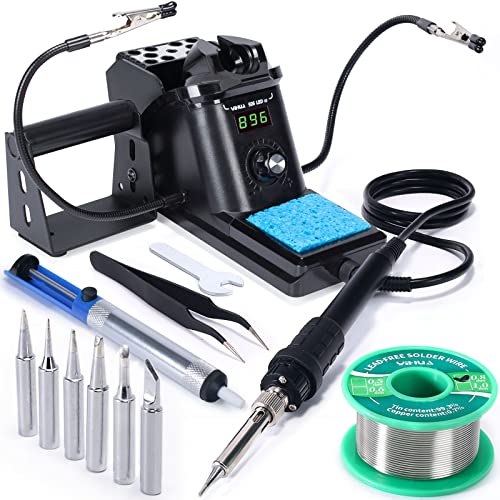
The YIHUA 926 III covers most of what the kits leave out in one box. According to the listing, it is a 60W temperature-controlled station with a digital display, °C/°F switching, auto-sleep and calibration. It ships with six spare tips, two helping hands, lead-free solder, a desoldering pump and tweezers.
Temperature control matters for a learner. The teen sets the tip heat and reads it on the display, instead of guessing with an unregulated iron. Our soldering iron temperature guide gives starting settings.
For the Gikfun SMD board, the YIHUA box covers tweezers. Add flux, and a fine tip if none of the spares suits small pads.
Heated flux sends smoke straight up toward whoever is leaning over the board. The KOTTO Solder Fume Extractor is a compact desktop fan with an activated-carbon filter that pulls solder smoke away from the work area. Its small footprint suits a bedroom desk or kitchen table. The filter is replaceable; replacement filters are sold separately.
A way to fix mistakes
On a multi-hour build, something will need undoing. The YIHUA kit includes a desoldering pump. Our solder sucker vs solder wick comparison explains when wick is the better tool.
Lead-free solder, not 60/40
We do not recommend leaded 60/40 solder as the default for a teen. CircuitMess advises lead-free solder for young makers. Leaded solder also brings rules that are easy to forget: wash hands after every session and keep food off the bench. The lead-free solder in the YIHUA box avoids that. Our lead-free vs. leaded solder guide covers the trade-offs.
Power for the finished project
The PEMENOL console needs batteries. The MUXWELL speaker and LEPANDA radio need a power source, and the MiOYOOW clock needs a power supply. Sort this out beforehand and the project works the moment the last joint cools.
Putting the gift together
Pick the kit by the teen's interest, then add the station and the fume fan. For more ideas by age and experience, see our soldering gift guide.
Best for: Anyone serious about learning — a real station beats a bare iron every time.
Our default recommendation for a first bench because of what arrives with it: helping hands, six tips, solder, a sucker and tweezers mean you can start the day it lands instead of placing a second order.
Best for: Anyone soldering indoors who wants to stop breathing flux fumes.
The cheapest meaningful health upgrade a bench can get. Solder smoke is vaporised flux, and this pulls it away from your face for the price of a tip set.
Watch out for: Carbon filter, not a fully ducted extractor
Is soldering safe for teens? Supervision and safety
Yes, with sensible habits. The main hazard is heat: according to CircuitMess, soldering involves temperatures above 300°C (570°F).
How much supervision
There is no official standard. CircuitMess describes the 13+ stage as ready for advanced builds, often with minimal supervision. Our recommendation: let experience set the level as much as age. A first-timer at 16 still benefits from an adult in the room for the first session. Step back once the teen reliably returns the iron to its stand, works with ventilation and unplugs when done. For the detailed version, read our parent's guide to soldering with kids and teens.
The bench rules
The iron lives in its stand whenever it is not touching the board.
Ventilate. Open a window at minimum. For regular indoor soldering, use a carbon-filter fan like the KOTTO. Our soldering fume safety guide explains what is in the smoke.
Lead-free solder by default. If leaded solder is ever used, wash hands afterward and keep food and drinks away from the bench.
Safety glasses for every session.
A heat-resistant work surface, not the bedspread or a varnished table.
Teens who enjoy their first build usually want a harder one. A sensible ladder:
A through-hole project with a clear payoff: the console, clock, radio or speaker above.
A denser board with a sensor and display: the BANRIA Color Recognition kit, for finer joints and real electronics concepts.
Surface-mount practice: the Gikfun EK7028, working down through smaller component sizes.
Hot air and rework: the next skill after hand-soldered SMD, covered in our SMD rework guide.
A teen drawn to code can branch off at any point with the amomii Testudo, whose Arduino-compatible microcontroller turns a soldering project into something to program. For more builds beyond this list, browse our soldering project kits.
When the iron starts holding them back, such as struggling with fine tips or wanting a better station for a growing bench, see our soldering stations and soldering irons roundups. The workbench essentials guide covers the order to add tools in.
Rather not hunt for each part? Here is the whole list, ready for your cart.
Shopping set · 7 items
Teen Maker Soldering Set
Teens can handle a longer build and will outgrow a toy-grade iron within a month. This set pairs a real temperature-controlled station with a retro game console kit, then adds the cutters, mat and fume extractor that turn a kit into a tidy finished gadget.
Adds all 7 items to your Amazon cart in one step — remove anything you already own before checkout. We earn a commission on qualifying purchases, at no extra cost to you.
Frequently asked questions
What age is appropriate for a teen to start soldering on their own?
There is no official standard, and experience matters more than age. CircuitMess describes 13+ as ready for advanced builds, often with minimal supervision, but we recommend an adult present for the first sessions at any age. Our parent's guide covers supervision in more detail.
Do these soldering kits come with a soldering iron?
No. None of the kits picked here includes an iron or solder, and several also need batteries or a power supply. A station such as the YIHUA 926 III, which comes with lead-free solder, tips, helping hands and a desoldering pump, fills the gap in one go.
Should a teen use lead-free or leaded solder?
Default to lead-free, which is what CircuitMess advises for young makers. If leaded solder is used, wash hands after each session, keep food off the bench and ventilate the room. Our lead-free vs. leaded solder guide explains the trade-offs.
Does a teen need a fume extractor?
At minimum, work with an open window so flux smoke can clear. For regular indoor soldering, a desktop carbon-filter fan like the KOTTO pulls the smoke away from the work area and the teen's face.
What's a good soldering kit for a teen who has never soldered?
Choose a through-hole build with a clear payoff: the MiOYOOW clock, the LEPANDA radio, or the PEMENOL console started on its easiest difficulty level. If they need something even simpler, our kids' soldering kit page has very short first projects.
Which soldering kit makes the best gift for a teenager?
Pick the kit by interest: the console for a gamer, the speaker for a music fan, the Testudo for a coder. Then add a temperature-controlled iron and a fume fan so it works straight out of the box. Our soldering gift guide has more ideas.